Events and series
How to create more events in your community, set up recurring series, and change or cancel single dates.
Create an event
Open Events in the sidebar and click New event. Inside an events space there's also a "Create an event…" row.
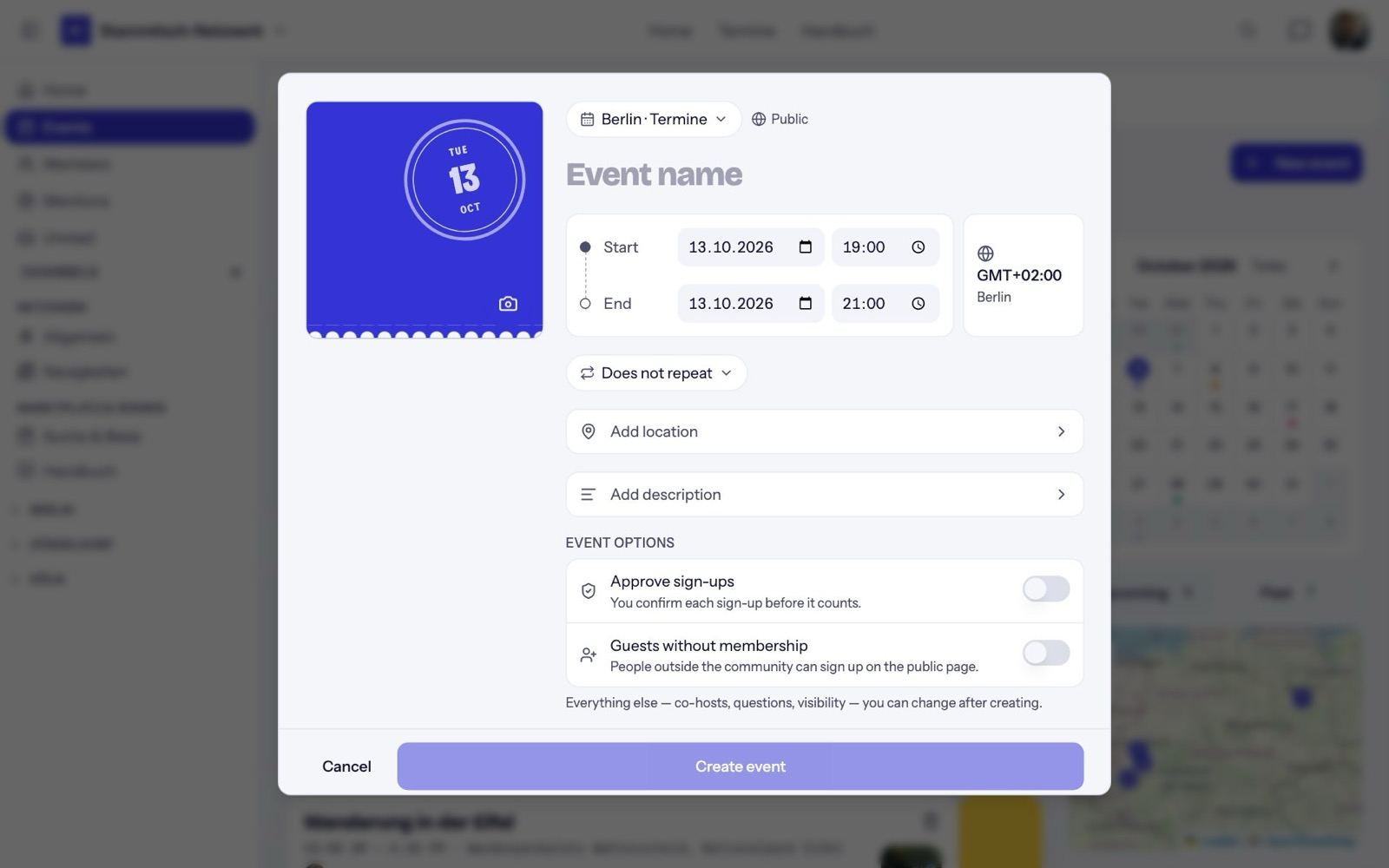
- Calendar: if your community has several calendars (one per city, say), choose where the event appears. Next to it you see whether the calendar is public or members only.
- Cover image: Choose image offers suggestions, an image search (Unsplash), uploads and links.
- Start, end and time zone.
- Location: "In person", "Online" or "Not set". The address search drops a pin on the map.
- Restrict location to guests: everyone else sees only postal code, city and a rough pin. Online events have "Link only for guests" instead.
- Event options: Approve sign-ups and Guests without membership (may people sign up who aren't members yet?).
Everything else — co-hosts, sign-up questions, guest list visibility — you set on the manage page after creating.
Recurring series
Choose a repeat rule when creating:
- Every Monday, Tuesday, …
- Every other week on the same weekday
- Every 1st, 2nd, 3rd or 4th weekday of the month
- Every last weekday of the month (if the start date is one)
- Monthly on the same date
Nori creates the next dates right away — about two months ahead, at most eight at a time — and keeps topping up. Every date has its own RSVPs, tickets and check-in. Guests can Follow series to hear about new dates.
Edit a date
Open the event and click Manage in the "You're hosting this event" bar, then Edit event. For a series, Nori asks what the change applies to:
- This date only
- This and all upcoming dates (only for whoever created the series; only here can you change the repeat rule)
Co-hosts can edit single dates, but not the whole series.
Cancel and end
Under Manage → More:
- Cancel this date: the date stays visible, marked "Cancelled". Restore brings it back.
- End the series after this date: later dates are cancelled, or removed if nobody signed up. This can't be undone.
- Duplicate event: creates a copy on the next matching date.
- Delete event: one-off events only, not dates of a series.